Cisco Nexus 9300 Datasheet Explained: Specifications, Features, and Deployment Guide
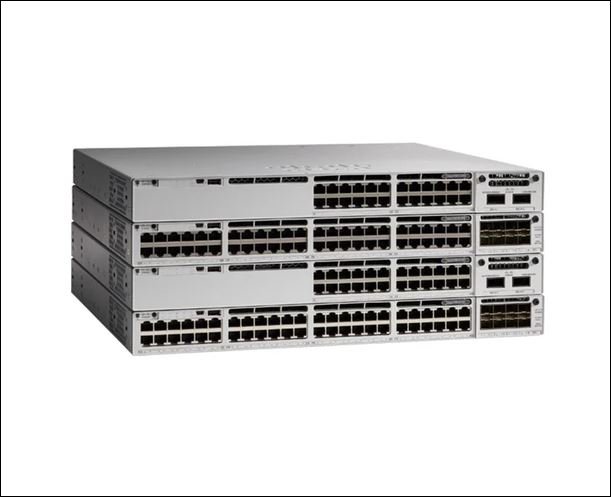
Why the Cisco Nexus 9300 Datasheet Matters Before Any Purchase Decision
Reviewing the Cisco Nexus 9300 datasheet before selecting a switch helps ensure the hardware aligns with current workloads, future scalability requirements, and overall data center design. The Cisco Nexus 9300 datasheet is not marketing material. It is the technical record that tells a buyer exactly how many ports a switch has, how much traffic it can move, how much power it draws, and which software modes it supports. Reviewing the datasheet carefully helps data center teams match the hardware to workload requirements and make informed infrastructure decisions based on technical specifications.
This guide walks through every section of a typical Cisco Nexus 9300 datasheet, explains what each specification actually means for daily operations, and shows how the platform fits into modern spine-leaf architecture, Cisco ACI deployments, and VXLAN-based cloud fabrics. Anyone comparing models across the Nexus 9300 family, from the 9300-FX series to the newer Nexus 9300-GX2 switches, will find a clear framework here for making an informed choice rather than a rushed one.
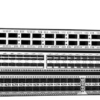
The Cisco Nexus 9300 family includes multiple fixed-port models that differ in interface speeds, port density, forwarding capacity, and software capabilities, allowing organizations to choose hardware that best aligns with their current infrastructure and future growth plans.
How to Read a Cisco Nexus 9300 Datasheet
Every Cisco Nexus 9300 datasheet follows a similar structure, and understanding that structure saves significant time during evaluation. The document typically moves through the following sequence.
- Ports: The datasheet lists downlink and uplink port counts along with supported speeds, such as 1, 10, 25, 40, 50, or 100 Gigabit Ethernet, depending on the model.
- Switching capacity: This section states the total bandwidth the switch can move internally, expressed in terabits per second, along with the forwarding rate in packets per second.
- Latency: Many Nexus 9300 models list port-to-port latency in microseconds, which matters most for latency-sensitive applications.
- Buffer: The datasheet specifies the available packet buffer memory, which affects how well the switch handles temporary traffic bursts and minimizes packet loss during periods of congestion.
- Power supply: Typical and maximum power draw appear here, along with available AC and DC power supply options.
- Cooling: This section covers airflow direction, either port-side intake or port-side exhaust, which determines how the switch fits into hot aisle and cold aisle rack designs.
- Software: The datasheet states whether the switch runs Cisco NX-OS mode, Cisco ACI mode, or both.
- Licensing: The final technical section explains which features come standard and which require additional licensing, such as Layer 3 routing or advanced telemetry.
Reading the datasheet in this order builds a complete picture of the switch before a buyer even looks at pricing, and it prevents the common mistake of choosing a model based on port count alone while ignoring buffer size or power requirements.
Understanding the technical specifications in a Cisco Nexus 9300 datasheet helps network architects compare models based on operational requirements rather than relying solely on port counts or pricing.
Breaking Down the Important Specifications
The table below translates raw datasheet numbers into practical meaning for a data center team.
| Specification | What It Means | Why It Matters | Impact on Performance |
| Switching capacity (Tbps) | Total internal bandwidth the switch fabric can handle | Determines whether the switch can support current and future traffic volume without becoming a bottleneck | Higher capacity supports more simultaneous high speed connections |
| Forwarding rate (bpps or mpps) | Number of packets the switch processes per second | Affects how well the switch handles high volumes of small packets, common in virtualized environments | Low forwarding rate under heavy load causes packet drops |
| Port density and speed | Number of ports and their supported Ethernet speeds | Defines how many servers or uplinks the switch can connect directly | Insufficient port speed forces costly aggregation layers |
| Buffer size | Amount of memory available to hold packets during congestion | Prevents packet loss during traffic bursts, especially in storage and AI workloads | Small buffers can cause microbursts to drop packets |
| Power consumption | Typical and maximum wattage draw | Affects rack level power budgeting and cooling design | Underestimating power draw leads to rack level power shortages |
| Software mode support | Cisco NX-OS mode or Cisco ACI mode | Determines automation capability and management style | ACI mode enables centralized, policy based fabric management |
Cisco publishes detailed hardware performance and scalability tables for each Nexus 9300 model, and comparing these numbers directly against expected workload requirements is the single most reliable way to avoid an undersized purchase.
Understanding Cisco Nexus 9300 Architecture
The Cisco Nexus 9300 platform is built around the concept of spine-leaf architecture, which replaced the older three-tier network design in most modern data centers. In a spine-leaf topology, leaf switches connect directly to servers and storage devices, while spine switches interconnect the leaf switches. Every leaf switch connects to every spine switch, which creates multiple equal-cost paths and removes the single point of failure that older core, aggregation, and access designs carried.
Cisco Nexus 9300 switches are most commonly deployed as leaf switches in spine-leaf architectures. Certain high-capacity models may also be used in compact spine deployments for smaller data center fabrics, depending on the network design and performance requirements. This flexibility enables organizations to use the same hardware family across different stages of data center growth while maintaining a consistent networking architecture.
East-west traffic, meaning traffic that moves between servers within the data center rather than in and out to external networks, has grown dramatically with the rise of virtualization and distributed applications. Spine-leaf architecture handles this traffic pattern far better than legacy designs because it keeps latency low and consistent between any two leaf switches.
Cisco Nexus 9300 switches operate in one of two modes. Cisco NX-OS mode runs the switch as a standard, individually managed Nexus switch. Cisco ACI mode integrates the switch into a fabric managed by the Cisco Application Policy Infrastructure Controller, which applies centralized, intent-based policies across the entire network rather than configuring each device separately. Cisco ACI is particularly suited to environments that need fast, repeatable provisioning of network policy for constantly changing application workloads.
VXLAN, or Virtual Extensible LAN, extends Layer 2 networks across Layer 3 boundaries, which allows workloads to move between racks or even between data centers while keeping the same network segment. EVPN, or Ethernet VPN, works alongside VXLAN as the control plane protocol that distributes reachability information across the fabric. Together, VXLAN and EVPN allow Cisco Nexus 9300 switches to build large, flexible overlay networks on top of a physical spine-leaf fabric, which is a foundational requirement for modern cloud infrastructure.
Deployment Scenarios for the Cisco Nexus 9300 Platform
Enterprise Data Center Deployment
An enterprise data center running a mix of business applications typically deploys Cisco Nexus 9300 switches as leaf switches, using NX-OS mode for straightforward management or ACI mode when the organization wants centralized policy control across multiple sites.
Private Cloud Deployment
Organizations building a private cloud rely on the Nexus 9300 platform to provide the underlying network fabric that supports virtual machine mobility, storage traffic, and tenant isolation, often using VXLAN and EVPN to segment different business units or customers on the same physical infrastructure.
Hybrid Cloud Deployment
A hybrid cloud environment connects on-premises infrastructure to public cloud resources. Cisco Nexus 9300 switches help provide the underlying network connectivity, while Cisco ACI can extend consistent network policies across on-premises infrastructure and supported cloud environments to simplify hybrid deployments.
High-Performance Computing Deployment
High performance computing clusters demand low latency and large buffers to handle bursty, high-volume traffic between compute nodes. Nexus 9300 models with sub-microsecond latency and larger buffer allocations suit this workload better than switches optimized purely for port density.
Virtualization Heavy Deployment
Environments running dense virtual machine or container workloads benefit from the Nexus 9300 platform’s support for network overlays and telemetry, which give administrators visibility into traffic between virtual workloads that would otherwise be difficult to monitor at the physical layer.
Performance Metrics Explained
Datasheet numbers only matter when a buyer understands what they represent in real operation.
Latency measures the time a packet takes to travel from an input port to an output port through the switch. Lower latency benefits financial trading systems, high-performance computing, and any application sensitive to microsecond-level delays.
Forwarding rate measures how many packets per second the switch can process. A high forwarding rate matters more in environments with many small packets, such as voice traffic or certain storage protocols, than in environments dominated by large, steady data transfers.
Buffer capacity determines how well a switch absorbs sudden spikes in traffic, known as microbursts, without dropping packets. Storage networks and AI training clusters often generate these bursts, making buffer size a critical specification rather than a secondary detail.
Bandwidth refers to the total data capacity available across all ports combined, and it should always be evaluated against expected peak traffic rather than average traffic.
Oversubscription describes the ratio between downlink bandwidth, meaning the traffic capacity from servers, and uplink bandwidth, meaning the capacity toward the rest of the network. A switch with 1 to 1 oversubscription can handle full line rate traffic from every downlink port simultaneously, while higher oversubscription ratios save cost but assume that not every port will be fully utilized at once.
Questions to Ask Before Selecting a Nexus 9300 Model
- How many ports does the current environment need today, and how many will it need in three years?
- Does the deployment require room for future expansion through breakout cables or additional uplink modules?
- Will the switch need to integrate with Cisco ACI, or will it run in standalone NX-OS mode?
- What are the power requirements per switch, and does the facility have sufficient power and cooling capacity per rack?
- How much rack space is available, and does the airflow direction of the switch match the rack’s cooling design?
- Does the deployment require redundant power supplies and dual supervisor-level resilience for high availability?
Working through these questions before requesting a quote gives a data center team a clear specification to compare across Nexus 9300 models rather than making a decision based on price alone.
Cisco Nexus 9300 Deployment Best Practices
Careful rack planning prevents cabling problems later, so administrators should confirm port-side intake or port-side exhaust airflow direction matches the rest of the row before installation. Redundant power supplies protect against a single power failure taking down a switch, and most Nexus 9300 models support dual power supply configurations for this reason. Keeping firmware current matters just as much as initial configuration, since Cisco regularly releases NX-OS updates that address security vulnerabilities and add feature support.
Ongoing monitoring, ideally through a platform like Cisco Nexus Dashboard, gives administrators visibility into buffer utilization, port errors, and traffic patterns before they become outages. Network segmentation through VLANs or VXLAN-based overlays limits the blast radius of any security incident, and automation through Cisco NX-OS programmability or Cisco ACI policy models reduces the manual configuration errors that cause a large share of network outages.
Businesses looking for Cisco Nexus 9300 switches can explore the Cisco product category on the Greencode Technologies website, where multiple Nexus models and their technical specifications are available for review before requesting pricing or deployment guidance.
Final Thoughts
Reading a Cisco Nexus 9300 datasheet carefully, rather than skimming for a single headline number, gives a data center team the information needed to select a switch that fits both current requirements and future growth. Port speeds, switching capacity, buffer size, power draw, and software mode support all interact to determine real-world performance, and understanding spine-leaf architecture, Cisco ACI, and VXLAN with EVPN puts every specification into proper context. The goal is not to find the switch with the biggest numbers on paper, but the one that matches the actual workload, rack environment, and growth plan of the data center it will serve.
Frequently Asked Questions
What is the Cisco Nexus 9300 used for?
The Cisco Nexus 9300 platform serves as a leaf switch, and in some models, a compact spine switch, in modern data center networks that use spine-leaf architecture, supporting enterprise applications, private cloud infrastructure, and high-performance computing environments.
What is Cisco ACI, and how does it relate to the Nexus 9300?
Cisco ACI is a policy-based, centrally managed fabric architecture that certain Cisco Nexus 9300 models support as a hardware foundation. It allows administrators to apply consistent application-level policies across the entire network from a centralized controller rather than configuring each switch individually.
Which operating system runs on the Cisco Nexus 9300 platform?
Cisco Nexus 9300 switches run Cisco NX-OS, a modular, programmable operating system that supports both standalone switch management and integration into an ACI fabric, depending on the deployment mode selected.
Does the Cisco Nexus 9300 support VXLAN and EVPN?
Yes, most current Cisco Nexus 9300 models support VXLAN with EVPN as the control plane, allowing data centers to build Layer 2 overlay networks across a Layer 3 spine-leaf fabric for greater workload mobility.
Who should consider deploying the Cisco Nexus 9300 rather than a smaller access switch?
Organizations running virtualized workloads, private or hybrid cloud infrastructure, or applications that require predictable low latency and high throughput benefit most from the Nexus 9300 platform, while smaller offices with simple connectivity needs may find a standard access switch sufficient.
Where can businesses source genuine Cisco Nexus 9300 hardware?
Businesses can explore the Cisco product category on the Greencode Technologies website to review available Cisco Nexus 9300 models, compare technical specifications, and contact the team for pricing, availability, and deployment guidance.
What is the typical warranty period on a Cisco Nexus 9300 switch?
Warranty coverage for Cisco Nexus 9300 switches varies depending on the specific model, region, and any applicable Cisco support or service agreements. Buyers should confirm the available warranty and support options with their Cisco partner or authorized supplier before making a purchase.
How does the Cisco Nexus 9300 compare to the Cisco Nexus 9200 series?
The Cisco Nexus 9300 Series offers a broader range of fixed-port switches with advanced capabilities, including higher performance, greater port-speed flexibility, and support for technologies such as Cisco ACI, VXLAN, and EVPN. The Cisco Nexus 9200 Series is designed as a cost-effective option for leaf deployments in modern data centers. The right choice depends on performance requirements, scalability goals, and the features needed for the deployment.
Is the Cisco Nexus 9300 suitable for AI and high-performance computing workloads?
Many Cisco Nexus 9300 models are well suited for AI, storage, and high-performance computing environments because they provide low latency, high throughput, advanced telemetry, and support for modern data center architectures. Selecting the appropriate model depends on workload size, interface speed requirements, and expected traffic patterns.
Lorem ipsum dolor sit amet, consectetur adipiscing elit, sed do eiusmod tempor incididunt ut labore et dolore magna aliqua…